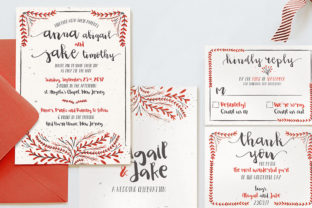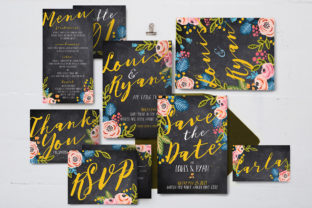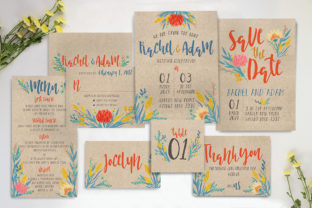
Evaluating the Watercolor Floral Wedding Suite: A Practical Guide for DIY Stationery
Selecting wedding stationery often involves balancing aesthetic vision with logistical constraints and budget. For couples who desire the organic, romantic texture of hand-painted art but require the precision of digital printing, a Watercolor Floral Wedding Suite presented in Photoshop format offers a distinct middle ground. Unlike pre-designed templates locked into specific web platforms or fully custom commissions from fine artists, this type of resource provides high-resolution, layered source files that allow for significant customization. Understanding the technical specifications and practical applications of these suites is essential for determining if they align with your specific planning needs, skill level, and production timeline.
Defining the Format and Technical Requirements
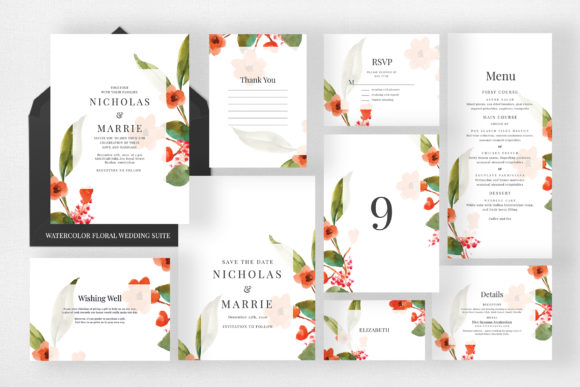
A Watercolor Floral Wedding Suite in this context refers to a collection of coordinated digital assets rather than physical goods. Specifically, this suite comprises nine distinct PSD (Photoshop Document) items designed to cover the full spectrum of wedding communication. The reliance on Adobe Photoshop (minimum version CS3) is the primary differentiator between this product category and consumer-grade template services. This requirement ensures that users have access to professional-grade layer management, color correction, and typography tools.
The technical foundation of this suite is built for print fidelity. Files are configured in CMYK color mode at 300 DPI, which is the industry standard for offset and high-quality digital printing. RGB files intended for screens often appear muddy or desaturated when printed; CMYK ensures the watercolor washes retain their vibrancy on paper. Furthermore, each file includes a 0.25-inch bleed. This safety margin is critical for professional trimming, preventing white borders from appearing if the paper shifts slightly during the cutting process. When evaluating any digital stationery asset, verifying these three specifications—CMYK, 300 DPI, and adequate bleed—is the first step in ensuring a usable product.
Inventory Breakdown and Sizing Standards
Cohesion across wedding materials relies on consistent visual language and standardized sizing. This suite addresses both through a comprehensive inventory that adheres to US postal and printing standards. Understanding these dimensions helps in estimating envelope costs and postage requirements early in the planning process.
- Invitation (US A7 / 5x7): The centerpiece of the suite. This size accommodates detailed wording and prominent floral illustrations without feeling crowded. It requires standard A7 envelopes.
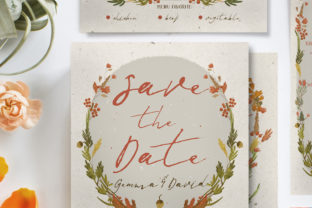
- Save the Date (US A2 / 4.25x5.5): A compact format suitable for mailing 6–8 months prior. The smaller footprint reduces postage costs while maintaining readability.
- Details Card (US A2 / 5.5x4.25): Designed for accommodation, transport, or website information. Note that this is landscape orientation, distinguishing it from the portrait Save the Date despite sharing the A2 designation.
- RSVP Card (US A2 / 5.5x4.25): Matches the details card dimensions, allowing them to be stacked neatly within the invitation envelope.
- Wishing Well & Thank You Cards (US A1 / 4.875x3.5): These smaller formats serve specific functional roles. The Wishing Well card communicates gift preferences discreetly, while the Thank You card provides a post-wedding correspondence solution that matches the original theme.
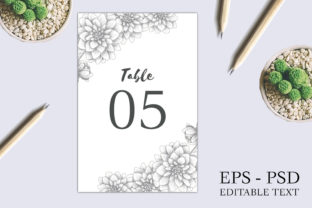
- Table Numbers (US A7 / 5x7): Utilizes the same footprint as the invitation for visual consistency on reception tables. This size is large enough to be visible from seated eye level.
- Place Cards (3.5x2): Standard tent card sizing compatible with most commercial place card holders and calligraphy guidelines.
- Menu (4x9): A tall, narrow format designed to fit inside napkins or stand vertically in glassware without obstructing table centerpieces.
Comparing PSD Suites to Alternative Solutions
When researching wedding stationery, couples typically encounter three primary categories: online template builders, custom designer commissions, and downloadable source files like this Watercolor Floral Wedding Suite. Each serves a different segment of the market based on budget, control, and capability.
Online template platforms offer ease of use and browser-based editing. However, they often limit font choices, restrict color palettes to predefined swatches, and charge per unit or require subscriptions. The output is frequently optimized for the platform’s preferred print partners, potentially limiting where you can produce the final goods. In contrast, owning the PSD files grants complete autonomy. You can change every hex code, swap fonts to match your brand identity, and send the files to any local or national printer. The tradeoff is the learning curve; Photoshop requires time to master, whereas template builders are designed for immediate, low-skill interaction.
Custom commissions provide a unique, hand-tailored experience but come at a premium price point and longer revision timelines. A Watercolor Floral Wedding Suite acts as a hybrid alternative. It offers the "custom" feel of editable layers and personalized text without the hourly design fees. While the underlying artwork is not exclusive to your wedding, the ability to manipulate colors, opacity, and arrangement allows for a degree of personalization that bridges the gap between generic templates and bespoke art. For couples who want professional aesthetics but have a DIY budget and intermediate technical skills, this format often represents the optimal value proposition.
Evaluating Editability and Smart Objects
The true utility of a PSD wedding suite lies in its layer structure. This specific suite utilizes Smart Objects, a feature that significantly streamlines the editing workflow. Smart Objects allow users to replace placeholder content non-destructively. Instead of erasing existing text or resizing floral elements manually—which can degrade image quality—you double-click the Smart Object layer, make your changes in a separate window, and save. The main document updates automatically with all transformations intact.
Fully editable colors and text backgrounds are equally important for adaptation. Watercolor florals are versatile, but a sage green botanical motif may clash with a burgundy autumn palette. Because the color layers are separated and adjustable via Hue/Saturation or Color Balance adjustment layers, the suite can be re-skinned to match seasonal variations or venue decor without repurchasing assets. Text background editability ensures legibility; if your chosen font is thin or light-colored, being able to adjust the opacity of the watercolor wash behind the text block prevents readability issues that often plague amateur designs.
Decision Factors: When This Suite Is the Right Fit
This Watercolor Floral Wedding Suite is best suited for planners who meet specific criteria. First, you must have access to and basic proficiency with Adobe Photoshop. If you do not own the software or find layer masks and blending modes intimidating, the utility of this product diminishes significantly. Second, you should have a confirmed printing strategy. Since these are print-ready CMYK files, they are ideal for professional digital or offset printing. They are less optimized for home inkjet printers, which typically use RGB drivers and cannot handle the 0.25-inch bleed trimming accurately without specialized equipment.
Conversely, this suite may not be appropriate if you require vector scalability. PSDs are raster-based; while 300 DPI is sufficient for stationery, scaling elements up for large-format signage (like a 4-foot welcome sign) may result in pixelation. Vector-based AI or EPS files would be superior for multi-scale applications. Additionally, if exclusivity is paramount—if seeing your floral motif on another couple's invitation would be distressing—a custom commission remains the only viable path. This suite offers licensed usage, not copyright ownership or exclusivity.
Practical Considerations for Production
Beyond the digital file itself, successful execution requires attention to physical production variables. The inclusion of nine distinct items means managing multiple paper stocks and finishes. Watercolor designs generally perform best on uncoated or matte papers; glossy coatings can flatten the subtle gradients and texture that define the watercolor aesthetic. Cotton or linen cardstocks enhance the tactile experience, reinforcing the organic nature of the floral art.
Proofing is another critical step. Monitor calibration varies wildly; what looks vibrant on a backlit screen may print darker or cooler. Always order a physical proof from your chosen printer before committing to the full run. Use the provided bleed guides to verify that no critical text or floral elements fall too close to the trim line. The 0.25-inch bleed included in this suite is generous by industry standards, providing a safe buffer, but visual verification is always necessary.
Finally, consider the timeline. Editing nine PSD files, sourcing fonts, selecting paper, and coordinating with a printer takes weeks, not hours. While faster than a custom design process, it is slower than clicking "order" on a template site. Factor in buffer time for revisions and shipping. For couples comfortable with Photoshop and seeking a balance of artistic quality, comprehensive coverage, and cost efficiency, this Watercolor Floral Wedding Suite provides a robust foundation for cohesive, professional-grade wedding stationery.