Elegant Floral Wedding Suite: Integrating Professional Design Assets into Your Event Workflow
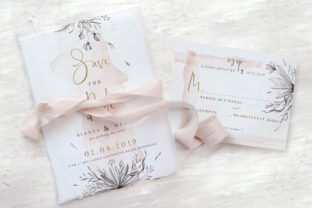
Planning a wedding involves managing dozens of interconnected visual touchpoints, from the initial announcement to the final thank-you note. For professionals, creators, and detail-oriented planners, maintaining visual consistency across these assets is not merely an aesthetic choice but a logistical necessity. The Elegant Floral Wedding Suite serves as a comprehensive design infrastructure for this process. Rather than treating stationery as isolated items, this suite functions as a unified system that streamlines the production of essential event collateral. By leveraging a cohesive set of Photoshop PSD files, users can execute a professional-grade stationery workflow that balances artistic elegance with practical production requirements.
This suite fits into the broader event planning ecosystem as a foundational asset library. It bridges the gap between conceptual branding and tangible print deliverables. Whether you are a freelance designer managing multiple client weddings, a small business owner creating in-house marketing materials for bridal services, or a productivity-minded individual handling your own event logistics, this resource reduces the friction associated with custom design. It eliminates the need to source matching templates individually, ensuring that typography, color palettes, and floral motifs remain consistent across every physical interaction point of the wedding experience.
Technical Specifications and Production Standards
Successful implementation of any digital design asset requires a clear understanding of its technical parameters. The Elegant Floral Wedding Suite is engineered for professional print workflows, adhering to industry standards that prevent costly production errors. The files are formatted as high-resolution Photoshop PSDs at 300 DPI in CMYK color mode. This specification is critical; while RGB is suitable for screen viewing, CMYK is the requisite color space for commercial and digital printing. Utilizing these files ensures that the soft, elegant floral tones seen on your monitor translate accurately to paper stock.
A defining feature of this suite is the inclusion of a 0.25-inch bleed on all documents. In professional printing, bleed is the area of artwork that extends beyond the trim edge. Without adequate bleed, slight shifts during the cutting process can result in unsightly white borders. This pre-configured safety margin allows designers and printers to execute clean trims without manual adjustment. Furthermore, the use of Smart Objects layers significantly enhances workflow efficiency. Instead of destructively editing pixel layers, users can replace placeholder content non-destructively. This preserves the integrity of the original floral artwork and allows for rapid iteration if text lengths change or if the suite needs to be adapted for different recipients or vendors.
System Requirements: Users must have Adobe Photoshop CS3 or later installed. Please note that mockups are not included with this purchase; the deliverable consists strictly of the editable source files. This distinction is important for resource planning, as you will need to visualize the final product using your own preview methods or rely on the accuracy of the provided dimensions.
Comprehensive Asset Inventory and Sizing Logic
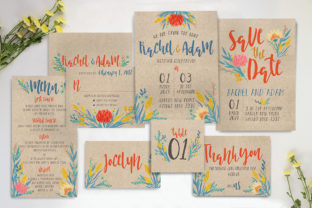
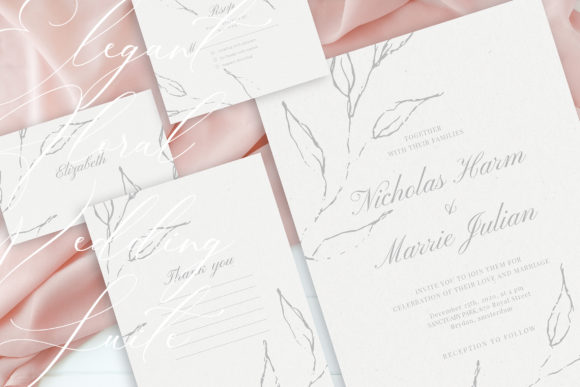
The suite includes nine distinct PSD items, each sized to standard US envelope and printing specifications. Understanding these dimensions is vital for ordering envelopes and coordinating with print vendors before beginning the design phase. The inventory covers the entire lifecycle of wedding communication:
- Invitation (US A7): 5.25 x 7.25 inches. This is the primary anchor piece. Its larger format accommodates detailed typography and elaborate floral arrangements without feeling cluttered.
- Save the Date (US A2): 4.25 x 5.5 inches. Designed for early-stage communication, this size balances visibility with postage efficiency.
- Details Card (US A2): 5.5 x 4.25 inches. Note the landscape orientation. This format is ideal for listing accommodation, transportation, or dress code information that does not fit on the main invitation.
- RSVP Card (US A2): 5.5 x 4.25 inches. Matching the details card, this landscape layout provides ample space for response options and meal selections.
- Wishing Well Card (US A1): 4.875 x 3.5 inches. A compact insert for registry or gift preferences, sized to tuck discreetly into the invitation ensemble.
- Thank You Card (US A1): 3.5 x 4.875 inches. Post-event correspondence maintains the visual identity established months prior, reinforcing brand consistency even after the celebration concludes.
- Table Numbers (US A7): 5 x 7 inches. Vertical orientation maximizes visibility across banquet tables while utilizing standard frame sizes.
- Place Cards: 3.5 x 2 inches. Small-format precision is required here; the template accounts for legibility at this reduced scale.
- Menu: 4 x 9 inches. A tall, narrow format that fits neatly within table settings or charger plates without obstructing centerpieces.
Workflow Integration: Pre-Production and Customization
Integrating the Elegant Floral Wedding Suite into your workflow begins long before opening Photoshop. Effective preparation involves gathering all variable data—names, dates, venues, vendor lists—and verifying them against the template capacities. Because the suite uses fully editable text and background colors, it is advisable to establish a style guide first. Define your specific hex codes or CMYK values and select complementary fonts before editing the master files. This prevents ad-hoc decisions that can lead to visual inconsistency across the nine different assets.
During the customization phase, leverage the layered structure to create a master template. Edit one file completely, including color adjustments and font replacements, then save it as a base reference. When moving to subsequent items like the RSVP or Menu, refer back to this master to ensure alignment. The Smart Objects functionality allows you to swap floral elements if necessary, but maintaining the original composition usually yields the most balanced result. For users managing multiple projects, consider organizing files by project stage rather than asset type. Grouping all "Print Ready" files separately from "Draft" versions reduces the risk of sending incorrect proofs to clients or printers.
Quality control is an ongoing process. Always view files at 100% zoom to check text sharpness and image resolution. Verify that all critical text remains within the safe zone, well away from the trim line. Since bleed is already configured, focus your attention on margin consistency. Use Photoshop’s ruler and guide tools to align text blocks across different card sizes. This geometric discipline ensures that despite varying dimensions, the suite feels like a singular, coordinated collection.
Post-Design Execution and Vendor Coordination
The utility of the Elegant Floral Wedding Suite extends into the production and post-event phases. When preparing files for print, flatten images only when requested by the vendor; otherwise, supply high-quality PDFs exported directly from Photoshop to preserve vector text quality. Communicate clearly with your printer regarding the 0.25-inch bleed. While the template includes it, confirming the printer’s specific tolerance prevents trimming issues. For DIY printing, ensure your printer settings are configured for "Actual Size" rather than "Fit to Page," which can alter the precise US standard dimensions.
After the event, the workflow continues with the Thank You cards. Because these share the same design DNA as the invitation, they serve as a bookend to the experience. Keep the master PSD file accessible for post-event edits. You may need to adjust wording or update backgrounds based on seasonal changes if there is a significant gap between the wedding and the mailing of thank-yous. This long-term usability makes the suite a sustainable resource rather than a single-use template.
For entrepreneurs and designers, this suite also offers scalability. The neutral yet sophisticated floral aesthetic allows for easy adaptation across different client demographics. By adjusting color grading and typography pairings within the existing PSD structure, you can create distinct variations for multiple weddings without rebuilding layouts from scratch. This efficiency directly impacts profitability and turnaround time in a creative business context.
Practical Considerations for Non-Designers
While the Elegant Floral Wedding Suite is a professional tool, it is accessible to hobbyists and self-managing couples who possess basic Photoshop literacy. However, users should realistically assess their skill level regarding layer management and print preparation. If you are new to PSD files, allocate time for learning Smart Object replacement and export settings before starting live edits. The requirement for Adobe Photoshop CS3 or newer means mobile apps or browser-based editors are not viable alternatives. Ensure your hardware can handle high-resolution CMYK files smoothly to avoid workflow bottlenecks.
Organization is equally important for non-professionals. Create a dedicated folder structure for your wedding stationery. Separate original templates from working files and final exports. Back up your work regularly. Losing progress on customized invitations due to poor file management adds unnecessary stress to an already complex planning process. Treat the digital assets with the same organizational rigor you apply to vendor contracts and guest lists.
Ultimately, the value of this suite lies in its ability to systematize creativity. It removes the guesswork from sizing and layout, allowing you to focus on personalization and content. Whether used for a single personal milestone or integrated into a professional design service, the Elegant Floral Wedding Suite provides a reliable, high-quality framework for producing beautiful, cohesive event stationery. By respecting the technical specifications and approaching customization with a structured workflow, users can achieve results that rival bespoke agency work while maintaining full control over the creative process.