Floral Alphabet: A Practical Guide to Using Digital Lettering Files Successfully
The intersection of typography and botanical illustration creates a timeless aesthetic that remains popular across crafting, branding, and home decor. When you encounter a Floral Alphabet digital download, you are looking at more than just pretty letters; you are acquiring a versatile design asset that bridges the gap between vintage charm and modern vector precision. These alphabets typically feature intricate vine work, delicate petals, and organic curves integrated directly into the letterforms. For creators ranging from small business owners producing wedding stationery to hobbyists personalizing nursery decor, this style offers an immediate way to elevate projects without hand-drawing every element from scratch.
However, the enthusiasm for acquiring these files often outpaces the technical understanding required to use them effectively. Many crafters and designers face frustration not because the artwork is flawed, but because they have mismatched their software capabilities with the file format or misunderstood the limitations of complex vector art. Before adding a Floral Alphabet to your library or attempting your first cut, it is essential to understand the practical realities of working with these specific digital assets to ensure your time and investment yield professional results.
Understanding File Formats Beyond the Extension
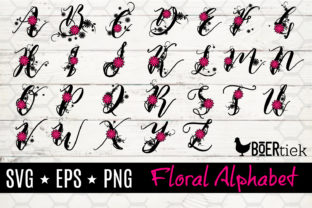
This listing contains a ZIP file including SVG, EPS, and PNG formats with transparent backgrounds. While most users know that SVGs are intended for cutting machines like Cricut Design Space or Silhouette Studio Designer Edition, fewer understand the structural differences that affect usability. A common mistake is assuming all SVG files behave identically. Floral Alphabets are inherently complex due to the high number of anchor points required to render smooth petal edges and winding stems. If you attempt to open a highly detailed floral letter in basic software or an older version of a cutting program, you may experience significant lag, crashing, or distorted rendering.
Furthermore, confusion often arises regarding the EPS file included in the bundle. Some beginners mistakenly try to upload EPS files directly into consumer-grade cutting software, only to find they are incompatible. EPS (Encapsulated PostScript) is primarily a professional print and vector editing format intended for Adobe Illustrator, CorelDRAW, or Affinity Designer. It serves as your master source file for resizing without quality loss or for modifying the artwork itself. If you need to change the color palette of the Floral Alphabet before cutting or printing, the EPS is your best option. Relying solely on the SVG for extensive editing can sometimes result in broken paths or lost grouping, whereas the EPS maintains the integrity of the original design structure.
The Transparency Trap with PNG Files
The inclusion of a PNG with a transparent background is invaluable for sublimation, digital planning, or mockups, yet this format is frequently misused. A critical error occurs when users attempt to use a standard raster PNG for vinyl cutting without realizing it lacks cut lines. Unlike an SVG, a PNG is a pixel-based image. While some software offers "trace" or "auto-cut" features, these rarely produce clean results on intricate floral typography. The machine may interpret internal shading or texture details as cut lines, resulting in a shredded, unusable mess. Always reserve the PNG for print applications or as a visual reference, and stick to the true vector SVG for any physical cutting task involving a Floral Alphabet.
Evaluating Software Compatibility Before Purchase
Please make sure you have the right software to use this file before buying. This warning cannot be overstated. Compatibility is not merely about whether a program opens the file; it is about whether the program handles the complexity gracefully. Users of ScanNCut, Sure Cuts a Lot, and Make the Cut should verify that their specific firmware and software versions support layered SVGs. Some older iterations flatten layers upon import, which can be disastrous if the Floral Alphabet relies on separate layers for different colors or assembly.
For Silhouette users, there is a persistent misunderstanding regarding the free Basic Edition versus the Designer Edition. Standard SVG support is generally locked behind the paid upgrade. Attempting to use a premium Floral Alphabet in the free version often leads to unnecessary workarounds, such as tracing a PNG, which degrades quality. Investing in the correct software tier is usually more cost-effective than wasting hours trying to force incompatible files to work. Similarly, Cricut users should be aware that Design Space has upload limits and processing thresholds. Extremely dense floral vectors may need to be simplified in external vector software before uploading to prevent timeout errors during the preparation phase.
Material Considerations for Intricate Designs
The application of a Floral Alphabet extends beyond digital compatibility to physical material selection. A frequent oversight is choosing materials that cannot withstand the detail level of botanical lettering. Vinyl types matter immensely here. Standard permanent vinyl may tear during weeding if the floral elements are too fine. Opting for premium cast vinyl or specialized glitter vinyl with a stronger backing can save an entire project. Conversely, using heat transfer vinyl (HTV) on textured fabrics requires careful pressure management; the delicate serifs and leaves of a Floral Alphabet can lift or crack if the substrate is too uneven or the press temperature is inconsistent.
When creating wooden signs or wall art, consider the scale. Shrinking a Floral Alphabet below its intended minimum size causes details to merge. Paint bleeding becomes inevitable on wood grain when letter heights drop below one inch for ornate styles. Testing the design at your intended size on scrap material is a non-negotiable step. Digital previews can be deceptive; what looks crisp on a monitor may become indistinguishable blobs when painted or cut at three inches wide. Adjusting the design complexity or selecting a bolder weight variant within the alphabet set is often necessary for smaller applications.
Optimizing Workflow for Professional Results
Efficiency in using these files comes from proper organization and preparation. Upon downloading the ZIP file, extract all contents immediately and organize them into a dedicated project folder rather than leaving them in the downloads directory. Broken links and missing assets often stem from poor file management. When working with the SVG in cutting software, always check the layer panel first. A well-structured Floral Alphabet will have logical grouping. If the design arrives flattened, take the time to ungroup and re-colorize elements before saving a project-specific copy. This prevents repetitive setup work for future uses.
For entrepreneurs and marketers using these alphabets for client work, remember that versatility drives value. The same Floral Alphabet used for a wedding invitation suite can be repurposed for matching thank-you cards, favor tags, and welcome signage by simply adjusting scale and spacing. However, avoid the temptation to stretch or distort the vector to fit awkward spaces. Botanical illustrations rely on natural proportions; stretching a letter vertically makes the flowers look unnatural and amateurish. Instead, adjust the layout or kerning to accommodate the fixed aspect ratio of the Floral Alphabet. Respecting the artist’s original proportions ensures the final product retains the elegance that attracted you to the style in the first place.
Ultimately, success with digital floral lettering lies in balancing creative vision with technical discipline. By verifying software requirements, respecting format distinctions, selecting appropriate materials, and maintaining proper file hygiene, you transform a simple digital download into a reliable tool for beautiful creation. Whether you are making a scrapbook page or launching a new product line, approaching the Floral Alphabet with informed intention ensures that your results are as flawless as the design itself.